Convert MOV to MP4, and any file into 19 formats
Drop in one video or audio file and pick every format you need. ClipNexa AI makes them all in one go, on your own computer. Included with every ClipNexa AI plan.
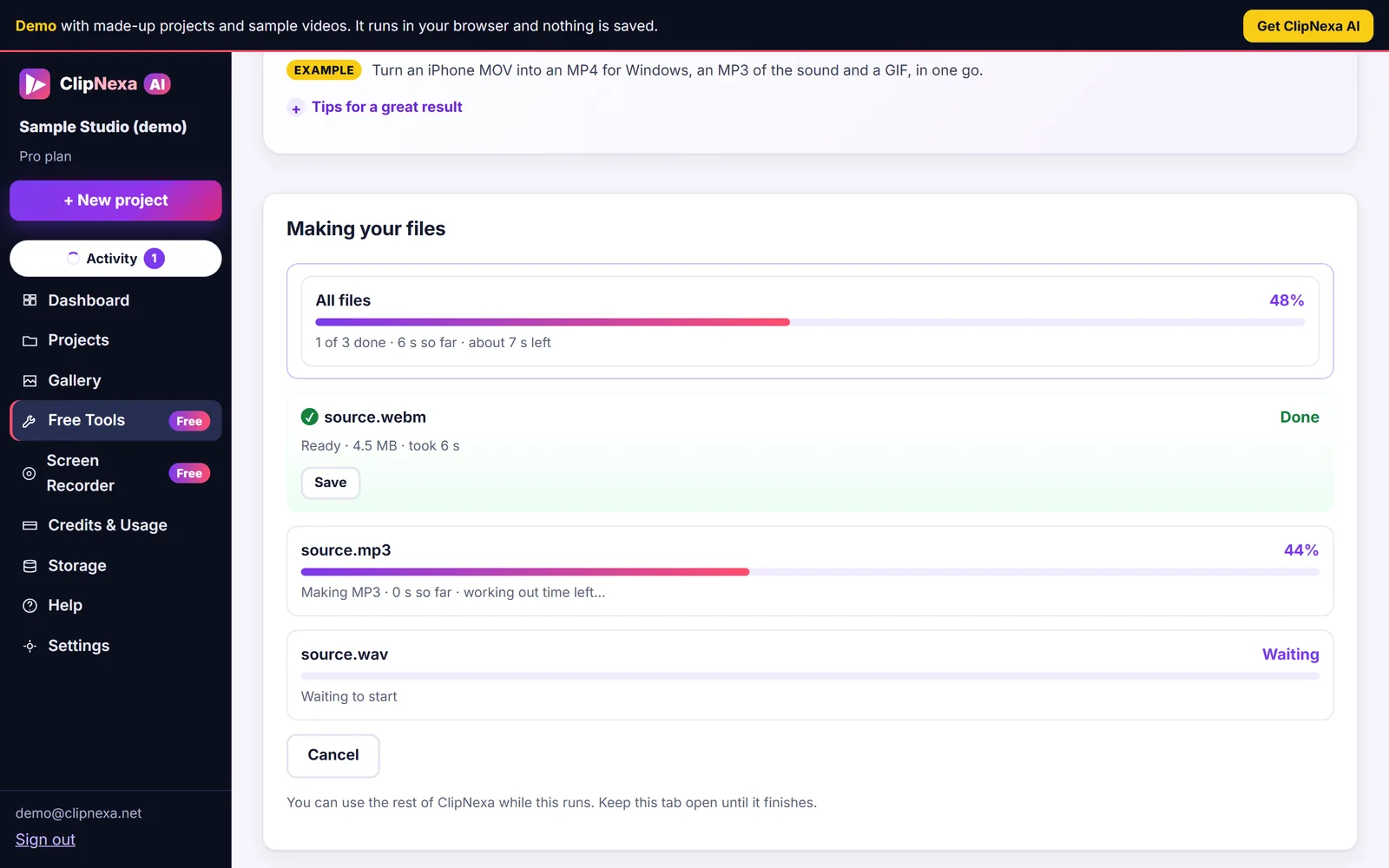
Three steps, on your computer
Nothing is uploaded and nothing is counted. Your files never leave your device.
- Drop in your fileA video, an audio file or a recording. It stays on your computer.
- Tick the formatsPick as many as you like: MP4 for everywhere, WebM for the web, MP3 for audio, GIF for chat and more.
- Save them allEach file shows its own progress bar with the time left. Save them one by one, all at once or as a ZIP.
What you can do with Convert
- MOV to MP4
- MKV to MP4
- MP4 to WebM
- WebM to MP4
- AVI to MP4
- WMV to MP4
- FLV to MP4
- MP4 to MP3
- MP4 to GIF
- MOV to MP3
- WAV to MP3
- M4A to MP3
- MP3 to WAV
- MP4 to MOV
- 3GP to MP4
- MPEG to MP4
One file, many formats
Turn one video into MP4, WebM, MOV and an MP3 of its sound at the same time.
Older formats too
Open and make AVI, WMV, FLV, 3GP and MPEG files, for old cameras, players and projects.
Your finished videos
Videos you made in ClipNexa AI can be exported as any of the 19 types, from the Gallery.
19 formats in and out
Runs on your computer- MP4
- MOV
- MKV
- WebM
- TS
- AVI
- WMV
- FLV
- 3GP
- MPEG
- MP3
- WAV
- M4A
- AAC
- FLAC
- OGG
- GIF
- PNG
- JPG
Runs on your computer. Nothing is uploaded. Speed depends on your device. AVI, WMV, FLV, 3GP and MPEG convert more slowly and are limited to about 2 GB per file.
Older format, slowerGood to know
- It runs on your own computer, so how fast it goes depends on your device.
- It works best in a current Chrome or Edge on a computer. Many tools also open on phones and tablets when the browser supports them, and each tool tells you if something is missing.
- AVI, WMV, FLV, 3GP and MPEG convert more slowly than the others, and each of those files is limited to about 2 GB.
- If your browser cannot write a type, the tool shows it as unavailable and says why, instead of failing.
Convert, plus 8 more tools, inside ClipNexa AI
Free Tools come with every ClipNexa AI plan, together with seven AI agents that turn one video into every clip and shape you need. Pay once, no subscription.
ClipNexa AI Starter
- All 7 AI agentsScout, Strategist, Copywriter, Editor, Sound Engineer, Brand & Compliance and QA Inspector.
- 120 cloud minutesFor heavy work in the cloud. Included once, never reset.
- 20 Clip Maker hoursOf cloud scans. Scans on your computer have no count.
- 100 Clip Maker AI runsCounted only when the AI writes the plan.
- 5 GB cloud storageCloud footage kept 30 days. Your computer has no limit.
- 1,000 projectsEach with its own media, brand and finished videos.
- 10 bonusesVariations, Quick Edit, the music library, brand kit and more.
- Free Tools9 tools and 19 formats, on your computer. Nothing uploaded, no counts.
- Videos made on your computerNo count (fair use), and no limit on video length.
- Commercial licence, updates and supportFor your own work, for the life of the product, from a real person.
Free Tools are for ClipNexa AI buyers: they are included with your plan, at no extra cost. Secure checkout by JVZoo, which appears on your statement. Prices are in US dollars and may exclude local taxes.
No income or results are promised. Results vary. Read our earnings disclaimer.
Every Free Tool in ClipNexa AI
Nine tools, 19 formats, on your computer. Nothing uploaded, no counts.
Convert
One file into many formats at once: MP4, MOV, WebM, GIF, MP3 and more.
How it works Free with your planCompress
Make big videos smaller for email, chat and uploads, at the size you choose.
How it works Free with your planTrim
Cut the start and end off any video or audio file.
How it works Free with your planResize & crop
Make any video tall, square or wide, or crop it to the size you need.
How it works Free with your planAudio tools
Take the sound out of a video, mute a video, or convert audio files.
How it works Free with your planGIF maker
Turn a moment into a GIF, or grab a frame as a PNG or JPG.
How it works Free with your planMerge
Join several videos into one file, in the order you choose.
How it works Free with your planRotate & speed
Fix sideways phone videos, flip them, or play them from 0.25x to 4x speed.
How it works Free with your planScreen Recorder
Record your screen with your camera in a corner. Keep it on your computer, or share a link.
How it worksConvert: straight answers
Is anything uploaded?
No. The tool runs in your browser, on your own computer. Your file is never sent to ClipNexa or anyone else.
Can I convert a video I made in ClipNexa AI?
Yes. Open it in the Gallery and choose "Export as". Cloud videos are downloaded once, then converted on your computer.
Does converting lower the quality?
Converting to another format re-encodes the picture and sound, so the copy is never bit-for-bit the original. For the best result, convert from your original file rather than from a copy that was already made smaller.
Can I make several file types at once?
Yes. Tick every type you want and they are all made in one go. AVI, WMV, FLV, 3GP and MPEG use a slower engine: they work, they just take longer, up to about 2 GB per file.
Every file type. Every quick fix.
Free Tools and seven AI agents, for one payment.
Get ClipNexa AI for $79One-time payment. No monthly fees.- Pay once, no subscription
- 14-day refund policy
- Secure checkout by JVZoo
Earnings Disclaimer
ClipNexa AI is software for making videos. It is not a business opportunity or an income program. We make no promises, representations or guarantees that you will earn any money, make any sales, gain views, followers or customers, or achieve any other result by using ClipNexa AI. Any results depend on factors outside our control, including your videos, your audience, where and how you publish, your effort, skills and experience, and market conditions. Most people who buy software like this do not earn significant income from it, and some earn nothing. Statements about saving time or money, and comparisons with hiring a freelancer or an agency, are illustrations based on typical market prices and our own testing; they are not guarantees, and actual prices and times vary. Sample videos and demo projects were made by us from scripted footage; they are not customer work, testimonials or customer results. Refunds are available within 14 days as described in our refund policy. Full text: earnings disclaimer.
Disclaimer: Please note that this product does not provide any guarantee of income or success. The results achieved by the product owner or any other individuals mentioned are not indicative of future success or earnings. This website is not affiliated with Facebook or any of its associated entities. Once you navigate away from Facebook, the responsibility for the content and its usage lies solely with the user. All content on this website, including but not limited to text, images, and multimedia, is protected by copyright law and the Digital Millennium Copyright Act. Unauthorized copying, duplication, modification, or theft, whether intentional or unintentional, is strictly prohibited. Violators will be prosecuted to the fullest extent of the law.
We want to clarify that JVZoo serves as the retailer for the products featured on this site. JVZoo® is a registered trademark of BBC Systems Inc., a Florida corporation located at 1809 E. Broadway Street, Suite 125, Oviedo, FL 32765, USA, and is used with permission. The role of JVZoo as a retailer does not constitute an endorsement, approval, or review of these products or any claims, statements, or opinions used in their promotion.